Pages

Thursday, April 24, 2014

How To Create Undeletable And Unrenamable Folders

Go to Start and then Click on Run Type cmd & hit enter (To open Command Prompt ).
Remember you cannot create Undeletable & unrenamable folder
in your root directory (i.e. where the windows is installed)
 That means you can't make this kind of folder in C: drive
if you installed windows on C:Type D: or E: and

Thursday, December 26, 2013

HOW TO HIDE UR DRIVER & FOLDER


These days, hiding or locking a folder or file is probably something you will need if you use a computer that others use too.
A previous post has been written on this topic here but I have found a few other methods of doing such a thing, excluding download programs that can be easily accessible to others.
Here are five other methods:

Windows

Method 1 (the easy one)

How to Unlock Forgot Android Pattern Lock – Easily

Android Pattern unlock in one of the best feature to lock your android device. But what happens if you somehow forget that pattern. So how to unlock you device without using unlock pattern. Now we can share, unlock it with following some simple step. Today here we will guide how you can unlock your Android if you forgot the unlock pattern of your android smartphone. Follow the step below to unlock your device.

How to Unlock Android Pattern with Google Account Username & password

*** HOW TO FIND SERIAL KEYS FROM GOOGLE***


steps:-
1) go to google.com
2) write the name of the software you want key
and add 94FBR at the end
Eg :- if you want to find key of IDM then write "
IDM 94FBR " (without quotes)
3) search it and you will find many sites with
serial keys of that softwares
DONE !!!!

Vodafone Free GPRS/3G Tricks

VODAFONE recently launched
facebook, twitter, email etc
combo(all three) pack for 15 days trail.(FREE)
Just type *505#
next you will get Menu options.
1. Face Book
2. Twiter
3. Email
4. Combo[all three]
Chose any option and use it Absolutely free of cost!Note: Try it at low balance.
WORKING PERFECTLY IN W.B, ASSAM, BIHAR, UP
.

Monday, November 4, 2013

How to Root Samsung Galaxy Y | A Step by Step Guide

If you follow this method to root Samsung Galaxy Y, then there is no reason for your failure. Just follow this step by step guide and see the magic.
Samsung Galaxy Y root guideSamsung Galaxy Y has created buzz in the Indian cell phone market due to its value of price. The price of this device is below Rs. 8000, which is very low for a decent Smartphone. There are some Android phones made by India brands like Micromax or Karbonn at that range but everybody do not like them. You cannot get a good multinational branded Android phone at such a low price as Samsung Galaxy Y. This is the main reason of its huge popularity.
Samsung Galaxy Y root guide

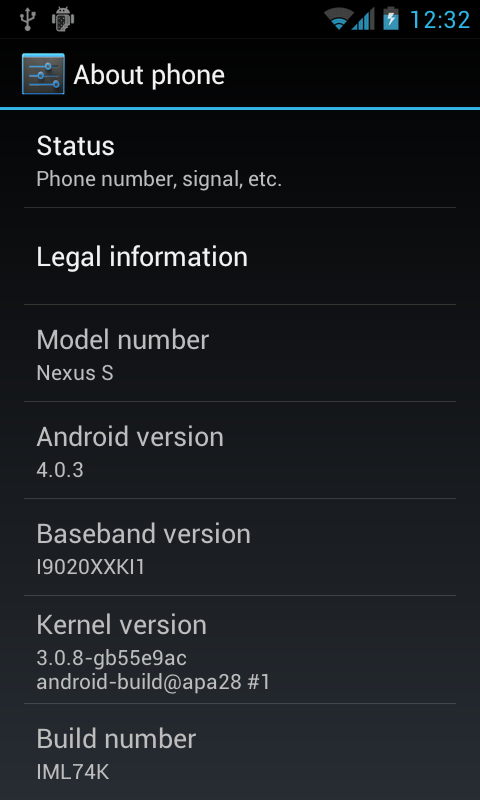
How to manually upgrade Nexus S from Android 2.3.6 to Android 4.0 Ice Cream Sandwich


If you own T-Mobile’s variant of Samsung Nexus S (i9020t) and don’t want to wait for the official OTA Android 4.0.3 update, you can install it manually. The procedure below will upgrade stock Android 2.3.6 build GRK39F to Android 4.0.3 build IML74K.
Android 4.0.3 Ice Cream Sandwich build IML74KWith a rooted phone the easiest update process is to use ROM Manager (Download ROM -> Stock Images -> Nexus S 4.0.3).
If you don’t have root, follow these manual steps (if you are new to the update process, check out this slightly outdated, but detailed update guide).
  • Download the update package.
  • Rename downloaded file to update.zip.
  • Copy the update.zip file to the phone’s internal storage.
  • Turn the phone off, press and hold Volume Up and Power to boot into the bootloader.